
- Secure Connection
- 256-bit Encryption
- Verified Service
- 30,000+ Visas Issued
Singapore eVisa Photo Requirements
A non-compliant photo is one of the fastest ways to get your eVisa delayed. Upload any clear photo when you apply through SingaporeeVisa.sg and our team formats it to ICA standards before submission, included free with every application.
35 x 45 mm
White Background
We Format It for You
We Format Your Photo Before Submission
You do not need to get the dimensions, cropping, or file size perfect. Upload any clear photo of yourself and our specialists handle the rest before it reaches ICA.
Upload Any Photo
Take a photo with your phone or use an existing one. Any reasonable dimension works, we will handle the rest.
We Resize and Format
Our team resizes, crops, adjusts the background, and optimises the file to meet all ICA specifications.
Submit with Confidence
Your photo is verified before submission, so technical photo issues will not cause a rejection from ICA.
Tip: While we handle all the technical formatting, a better source photo gives a better result. Use natural lighting, face the camera directly, and stand in front of a plain white wall for the best outcome.
30,000+
Visas Processed
28
Eligible Countries
98%
Approval Rate
3 WD
Express Processing
Singapore eVisa Photo Specifications
The full list of requirements set by Singapore's Immigration & Checkpoints Authority. Our team checks every one of these before submitting your application.
| Dimensions | 35 x 45 mm (width x height), standard passport photo size |
| File Format | JPEG (.jpg) or PNG (.png) |
| File Size | Minimum 20 KB, maximum 2 MB |
| Background | Plain white only, no patterns, textures, or visible objects |
| Face Coverage | Face should occupy 70-80% of the frame, chin to crown clearly visible |
| Expression | Neutral expression, mouth closed, both eyes open and clearly visible |
| Glasses | Not allowed, all glasses must be removed including prescription frames |
| Head Covering | Religious headwear only, full face from forehead to chin must remain visible |
| Recency | Taken within the last 3 months, must match your current appearance |
| Quality | Clear, sharp, well-lit, no blur, pixelation, or overexposure |
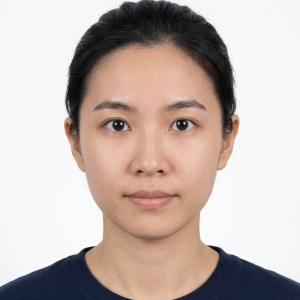
- 35 x 45 mm
- White background
- Neutral expression
- No glasses
Quick Reference: Do's and Don'ts
A scannable checklist so you know exactly what to aim for and what to avoid.
✓ Do
- Use a 35 x 45 mm passport-style photo
- Stand in front of a plain white wall
- Centre your face, filling 70-80% of the frame
- Keep both ears visible where possible
- Use soft, even, front-facing lighting
- Take the photo within the last 3 months
- Keep a neutral expression, mouth closed
- Use your phone's highest quality camera setting
- Save as JPEG or PNG, between 20 KB and 2 MB
✗ Don't
- Use a selfie with an angled or tilted face
- Use a coloured, patterned, or busy background
- Wear glasses of any kind, including prescription
- Use filters, beautify mode, or heavy editing
- Submit a blurry, pixelated, or overexposed photo
- Crop from a group photo or full-body shot
- Use a photo older than 3 months
- Send photos via WhatsApp first (compression ruins quality)
- Smile, show teeth, or close your eyes
Photo Requirements FAQ
It depends. If your passport photo meets the Singapore eVisa specifications (35 x 45 mm, white background, JPEG or PNG format, 20 KB to 2 MB), you can use it. However, many passport photos are taken for different size requirements and may not meet the exact ICA specifications. If you apply through SingaporeeVisa.sg, you can upload your passport photo and our team will resize and adjust it to meet the correct specifications before submission.
All glasses must be removed for your eVisa photo, including prescription frames and tinted lenses. There are no exceptions. Religious head coverings such as hijabs, turbans, or yarmulkes are permitted, but your full face from forehead to chin must be clearly visible with no shadows cast by the headwear. The covering must not obscure any part of your facial features.
Photo issues are one of the most common reasons for eVisa delays and rejections. ICA has strict requirements and automated systems may flag photos that do not comply. When you apply through SingaporeeVisa.sg, our team reviews and formats every photo before submission, so technical issues like wrong dimensions, file size, or minor background problems will not cause a rejection.
Yes. Photo formatting is included with every application at no extra charge. Our team resizes your photo to the exact 35 x 45 mm dimensions, crops it correctly so your face fills 70-80% of the frame, adjusts the background if needed, and optimises the file size and format to meet ICA requirements. You just need to upload a clear, well-lit photo of yourself.
Yes. Modern smartphone cameras produce photos that are more than sufficient quality for eVisa applications. Stand in front of a plain white wall, use natural daylight or soft indoor lighting, hold the phone at eye level, and make sure the photo is sharp and well-lit. Remove your glasses, look directly at the camera with a neutral expression, and have someone else take the photo if possible. Our team will handle the cropping and formatting from there.
ICA requires the photo file to be between 20 KB and 2 MB in either JPEG (.jpg) or PNG (.png) format. Photos taken directly with a smartphone camera are usually within this range. Photos sent through messaging apps like WhatsApp are often over-compressed and may fall below the minimum. When you apply through SingaporeeVisa.sg, our team optimises the file to the correct size and format, so you do not need to worry about this.
Yes. The Singapore eVisa photo specifications are the same for all 28 eligible nationalities. ICA applies the same photo standards regardless of which country you are applying from. The requirements listed on this page apply to everyone.
No. ICA requires a neutral expression with your mouth closed. A natural, relaxed face is fine, but visible teeth, wide smiles, or exaggerated expressions will cause the photo to be rejected. Both eyes must be open and looking directly at the camera.
Don't Let a Photo Hold Up Your Visa
Upload any clear photo, our team handles the formatting. Cropping, resizing, and ICA compliance are included with every application.